ubuntu24.04系统使用docker运行ubuntu22.04ros-humble, 雷达tcp通信问题
-
新手,安装windows/linux双系统
第九章导航部分运行ros2 launch fishbot_bringup bringup.launch.py
root@xu-HP-Laptop-15-fd0xxx:/workspace# ls /tmp/tty_laser
/tmp/tty_laser
root@xu-HP-Laptop-15-fd0xxx:/workspace# rm -f /tmp/tty_laser
root@xu-HP-Laptop-15-fd0xxx:/workspace# ros2 launch fisbot_bringup bringup.launch.py
[INFO] [launch]: All log files can be found below /root/.ros/log/2026-04-06-02-52-22-650909-xu-HP-Laptop-15-fd0xxx-748
[INFO] [launch]: Default logging verbosity is set to INFO
[INFO] [joint_state_publisher-1]: process started with pid [750]
[INFO] [robot_state_publisher-2]: process started with pid [752]
[INFO] [odom2tf-3]: process started with pid [754]
[INFO] [micro_ros_agent-4]: process started with pid [756]
[INFO] [tcp_server-5]: process started with pid [758]
[micro_ros_agent-4] [1775443942.679792] info | UDPv4AgentLinux.cpp | init | running... | port: 8888
[micro_ros_agent-4] [1775443942.679958] info | Root.cpp | set_verbose_level | logger setup | verbose_level: 4
[robot_state_publisher-2] [INFO] [1775443942.691025679] [robot_state_publisher]: got segment base_footprint
[robot_state_publisher-2] [INFO] [1775443942.691092532] [robot_state_publisher]: got segment base_link
[robot_state_publisher-2] [INFO] [1775443942.691097670] [robot_state_publisher]: got segment laser_link
[tcp_server-5] [INFO] [1775443942.767782802] [tcp_socket_server_node]: TCP端口:8889,已映射到串口设备:/tmp/tty_laser
[tcp_server-5] [INFO] [1775443942.768082592] [tcp_socket_server_node]: 等待接受连接..
[joint_state_publisher-1] [INFO] [1775443942.817016954] [joint_state_publisher]: Waiting for robot_description to be published on the robot_description topic...
[micro_ros_agent-4] [1775443950.193899] info | Root.cpp | create_client | create | client_key: 0x100DB5DF, session_id: 0x81
[micro_ros_agent-4] [1775443950.194075] info | SessionManager.hpp | establish_session | session established | client_key: 0x100DB5DF, address: 192.168.43.142:47138
[micro_ros_agent-4] [1775443950.221106] info | ProxyClient.cpp | create_participant | participant created | client_key: 0x100DB5DF, participant_id: 0x000(1)
[micro_ros_agent-4] [1775443950.313902] info | ProxyClient.cpp | create_topic | topic created | client_key: 0x100DB5DF, topic_id: 0x000(2), participant_id: 0x000(1)
[micro_ros_agent-4] [1775443950.331744] info | ProxyClient.cpp | create_subscriber | subscriber created | client_key: 0x100DB5DF, subscriber_id: 0x000(4), participant_id: 0x000(1)
[micro_ros_agent-4] [1775443950.347877] info | ProxyClient.cpp | create_datareader | datareader created | client_key: 0x100DB5DF, datareader_id: 0x000(6), subscriber_id: 0x000(4)
[micro_ros_agent-4] [1775443950.362705] info | ProxyClient.cpp | create_topic | topic created | client_key: 0x100DB5DF, topic_id: 0x001(2), participant_id: 0x000(1)
[micro_ros_agent-4] [1775443950.373030] info | ProxyClient.cpp | create_publisher | publisher created | client_key: 0x100DB5DF, publisher_id: 0x000(3), participant_id: 0x000(1)
[micro_ros_agent-4] [1775443950.385032] info | ProxyClient.cpp | create_datawriter | datawriter created | client_key: 0x100DB5DF, datawriter_id: 0x000(5), publisher_id: 0x000(3)
[INFO] [ydlidar_node-6]: process started with pid [833]
[ydlidar_node-6] [INFO] [1775443952.733085937] [ydlidar_node]: [YDLIDAR INFO] Current ROS Driver Version: 1.0.1
[ydlidar_node-6]
[ydlidar_node-6] [2026-04-06 02:52:32][info] SDK initializing
[ydlidar_node-6] [2026-04-06 02:52:32][info] SDK has been initialized
[ydlidar_node-6] [2026-04-06 02:52:32][info] SDK Version: 1.2.9
[ydlidar_node-6] [2026-04-06 02:52:32][info] Connect elapsed time 0 ms
[ydlidar_node-6] [2026-04-06 02:52:32][info] Lidar successfully connected [/tmp/tty_laser:115200]
[ydlidar_node-6] [2026-04-06 02:52:32][info] Lidar running correctly! The health status good
[ydlidar_node-6] [2026-04-06 02:52:32][info] Current Lidar Model Code 12
[ydlidar_node-6] [2026-04-06 02:52:32][info] Check status, Elapsed time 0 ms
[ydlidar_node-6] [2026-04-06 02:52:32][info] Lidar init success, Elapsed time [0]ms
[ydlidar_node-6] [2026-04-06 02:52:33][info] Start to getting intensity flag
[ydlidar_node-6] [2026-04-06 02:52:35][info] [YDLIDAR] End to getting intensity flag
[ydlidar_node-6] [2026-04-06 02:52:35][info] [YDLIDAR] Create thread 0xB34CC640
[ydlidar_node-6] [2026-04-06 02:52:36][info] Successed to start scan mode, Elapsed time 3558 ms
[ydlidar_node-6] [2026-04-06 02:52:36][error] Timeout count: 1
[ydlidar_node-6] [2026-04-06 02:52:37][error] Timeout count: 2
[ydlidar_node-6] [2026-04-06 02:52:38][error] Timeout count: 3
[ydlidar_node-6] [2026-04-06 02:52:41][error] Timeout count: 1
[ydlidar_node-6] [2026-04-06 02:52:42][error] Timeout count: 2
[ydlidar_node-6] [2026-04-06 02:52:43][error] Timeout count: 3
[ydlidar_node-6] [2026-04-06 02:52:45][error] Timeout count: 1
[ydlidar_node-6] [2026-04-06 02:52:46][error] Failed to turn on the Lidar, because the lidar is [Device Failed].
[ydlidar_node-6] [INFO] [1775443966.471488812] [ydlidar_node]: [YDLIDAR INFO] Now YDLIDAR is stopping .......
[INFO] [ydlidar_node-6]: process has finished cleanly [pid 833]
[ydlidar_node-6]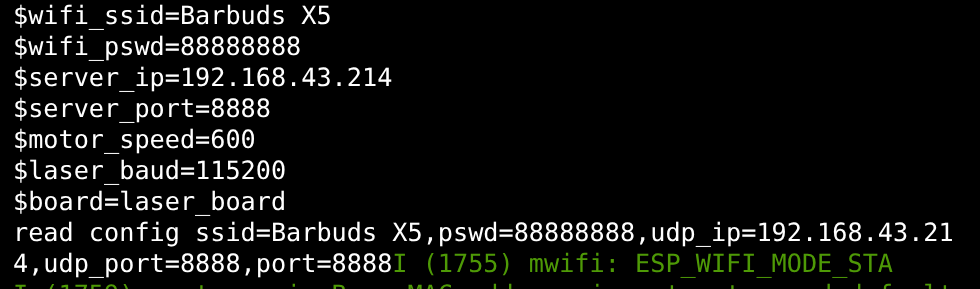
-
@3572217912
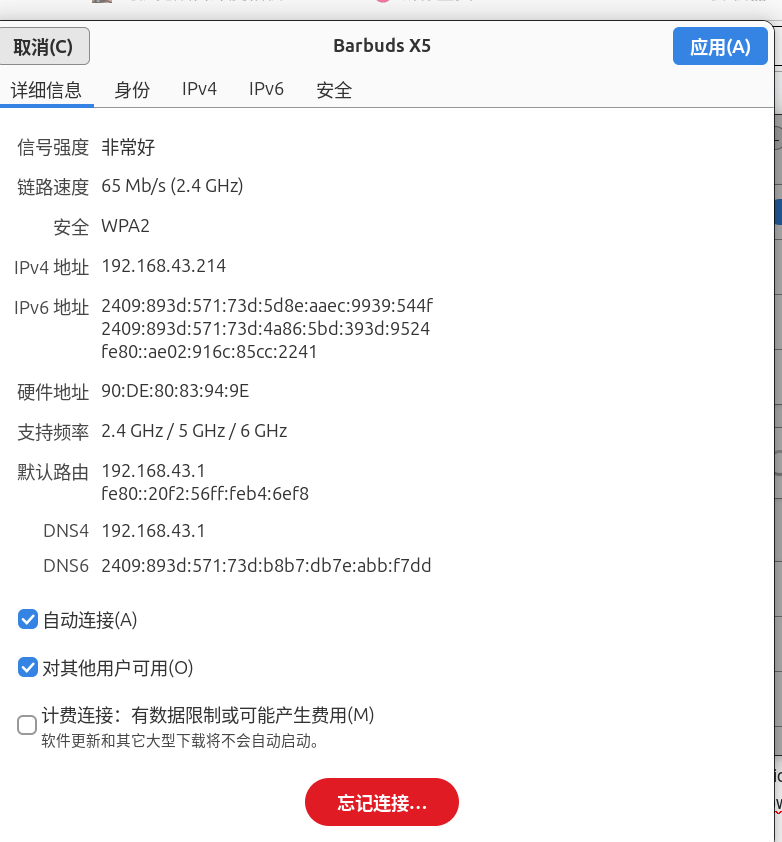
雷达和开发板的端口问题,ESP32开发版端口设置为8888,雷达开发板子设置为8889