【教程】使用Windows子系统WSL安装ROS2运行小海龟
-
无法将磁盘“C:\Users\qwert\AppData\Local\Packages\CanonicalGroupLimited.Ubuntu22.04LTS_79rhkp1fndgsc\LocalState\ext4.vhdx”附加到 WSL2: 系统找不到指定的文件。
错误代码: Wsl/Service/CreateInstance/MountVhd/HCS/ERROR_FILE_NOT_FOUND -
@小鱼 在 【教程】使用Windows子系统WSL安装ROS2运行小海龟 中说:
wget http://fishros.com/install -O fishros && bash fishros
@小鱼 在 【教程】使用Windows子系统WSL安装ROS2运行小海龟 中说:
wget http://fishros.com/install -O fishros && bash fishros
-
如果想要卸载怎么办呀?
-
@Zengs 在 【教程】使用Windows子系统WSL安装ROS2运行小海龟 中说:
@mahong1237 我也是这个问题,但是我再开启一个终端运行rqt,刷新node graph,小海龟就可以操作了
情况+1,大家有找到解决方案嘛
情况说明
使用wsl-22.04运行海龟程序,键盘控制无法生效
开启一个终端运行rqt,刷新node graph,可以使用关闭以后无法使用
ros2 node list等指令无法使用 -
根据您的系统,为您推荐安装源为['http://mirrors.tuna.tsinghua.edu.cn/ros2/ubuntu/']
创建文件:/etc/apt/sources.list.d/ros-fish.list
Run CMD Task:[sudo apt update]
[-][2.20s] CMD Result:code:100 >apt更新失败,后续程序可能会继续尝试...,[]
Run CMD Task:[sudo apt search ros-base ]
[-][1.17s] CMD Result:success换源后更新失败,第二次开始切换源,尝试更换ROS2源为华为源!
根据您的系统,为您推荐安装源为['https://repo.huaweicloud.com/ros2/ubuntu/']
Run CMD Task:[sudo rm -rf /etc/apt/sources.list.d/ros-fish.list]
[-][0.00s] CMD Result:success创建文件:/etc/apt/sources.list.d/ros-fish.list
Run CMD Task:[sudo apt update]
[-][2.42s] CMD Result:code:100 >apt更新失败,后续程序可能会继续尝试...,[]
Run CMD Task:[sudo apt search ros-base ]
[-][1.16s] CMD Result:success换源后更新失败,第三次开始切换源,尝试使用https-ROS官方源~!
根据您的系统,为您推荐安装源为['https://packages.ros.org/ros2/ubuntu/']
Run CMD Task:[sudo rm -rf /etc/apt/sources.list.d/ros-fish.list]
[-][0.00s] CMD Result:success创建文件:/etc/apt/sources.list.d/ros-fish.list
Run CMD Task:[sudo apt update]
[/][10.25s] Certificate verification failed: The certificate is NOT trusted. The name in the certificate does not matc[][10.25s] Certificate verification failed: The certificate is NOT trusted. The name in the certificate does not matc[][10.25s] Certificate verification failed: The certificate is NOT trusted. The name in the certificate does not matc[][10.35s] Certificate verification failed: The certificate is NOT trusted. The name in the certificate does not matc[][10.45s] Certificate verification failed: The certificate is NOT trusted. The name in the certificate does not matc[][10.55s] Certificate verification failed: The certificate is NOT trusted. The name in the certificate does not matc[][10.65s] Certificate verification failed: The certificate is NOT trusted. The name in the certificate does not matc[][10.75s] Certificate verification failed: The certificate is NOT trusted. The name in the certificate does not matc[][10.85s] Certificate verification failed: The certificate is NOT trusted. The name in the certificate does not matc[][10.95s] Certificate verification failed: The certificate is NOT trusted. The name in the certificate does not matc[][11.05s] Certificate verification failed: The certificate is NOT trusted. The name in the certificate does not matc[][11.15s] Certificate verification failed: The certificate is NOT trusted. The name in the certificate does not matc[][11.25s] Certificate verification failed: The certificate is NOT trusted. The name in the certificate does not matc[][11.35s] Certificate verification failed: The certificate is NOT trusted. The name in the certificate does not matc[-][11.80s] CMD Result:successRun CMD Task:[sudo apt search ros-base ]
[-][1.06s] CMD Result:success换源后更新失败,第四次开始切换源,尝试更换ROS源为http-ROS官方源!
根据您的系统,为您推荐安装源为['http://packages.ros.org/ros2/ubuntu/']
Run CMD Task:[sudo rm -rf /etc/apt/sources.list.d/ros-fish.list]
[-][0.00s] CMD Result:success创建文件:/etc/apt/sources.list.d/ros-fish.list
Run CMD Task:[sudo apt update]
[-][3.08s] CMD Result:code:100 >apt更新失败,后续程序可能会继续尝试...,[]
Run CMD Task:[sudo apt search ros-base ]
[-][1.06s] CMD Result:successRun CMD Task:[sudo apt update]
[-][2.71s] CMD Result:code:100 >apt更新失败,后续程序可能会继续尝试...,[]
四次换源后都失败了,请及时联系小鱼获取解决方案并处理!
Run CMD Task:[sudo apt search ros-base ]
[-][1.13s] CMD Result:success欢迎加入机器人学习交流QQ群:438144612(入群口令:一键安装)
鱼香小铺正式开业,最低499可入手一台能建图会导航的移动机器人,淘宝搜店:鱼香ROS 或打开链接查看:https://item.taobao.com/item.htm?id=696573635888
如在使用过程中遇到问题,请打开:https://fishros.org.cn/forum 进行反馈小鱼哥,四次换源都失败了啊 换了网络还是不行 找不出原因了
-
@abnerayyub 再试试,刚更新
-
@小鱼 感谢 小鱼哥 安装成功
-
@李万宝 解决了,需要在这个终端的界面里使用按键,鼠标点一下这个终端,在光标这里按键盘

-
@施 在 【教程】使用Windows子系统WSL安装ROS2运行小海龟 中说:
无法将磁盘“C:\Users\qwert\AppData\Local\Packages\CanonicalGroupLimited.Ubuntu22.04LTS_79rhkp1fndgsc\LocalState\ext4.vhdx”附加到 WSL2: 系统找不到指定的文件。
错误代码: Wsl/Service/CreateInstance/MountVhd/HCS/ERROR_FILE_NOT_FOUND@施 咋解决的?我也突然遇到这个问题了。
-
此回复已被删除! -
@lovedreamms 在 【教程】使用Windows子系统WSL安装ROS2运行小海龟 中说:
@Zengs 在 【教程】使用Windows子系统WSL安装ROS2运行小海龟 中说:
@mahong1237 我也是这个问题,但是我再开启一个终端运行rqt,刷新node graph,小海龟就可以操作了
情况+1,大家有找到解决方案嘛
情况说明
使用wsl-22.04运行海龟程序,键盘控制无法生效
开启一个终端运行rqt,刷新node graph,可以使用关闭以后无法使用
ros2 node list等指令无法使用同样的问题已解决。
修改user下的.wslconfig, 把配置文件里的firewall=true改为firewall=false -
我这边一直显示依赖问题

按照括号后面操作了也完全没有用
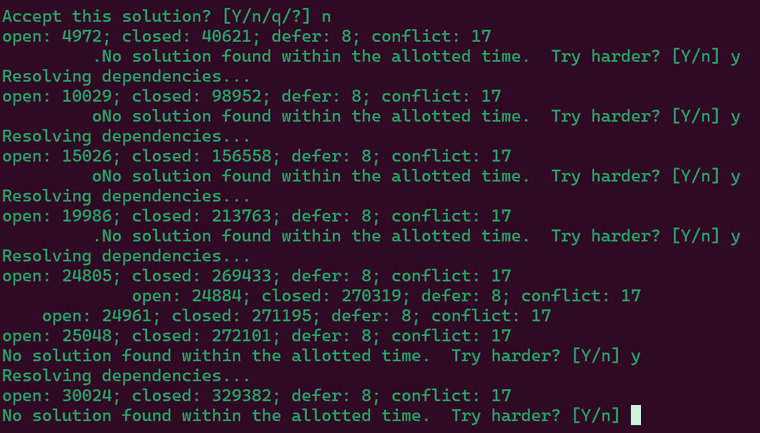
在另一个窗口输入命令也是一样的结果 -
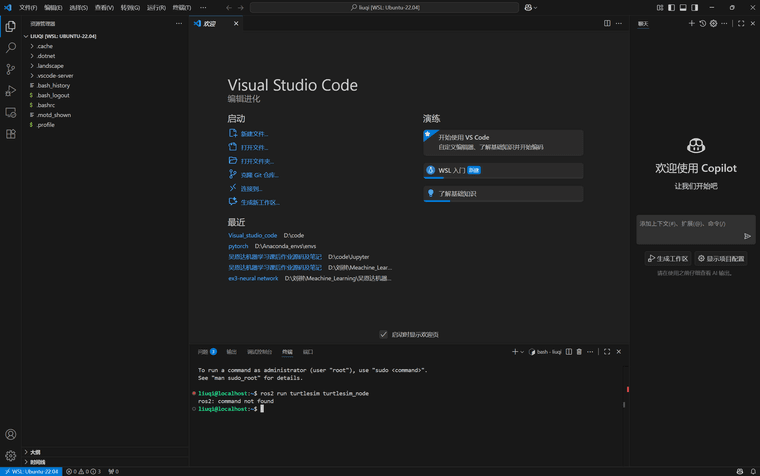
为什么我的VScode运行不了ros2呀?明明我下了ros2
-
@李万宝 wsl2图形的解决办法:
WSLg 是微软官方为 WSL 提供的内置 GUI 支持功能。它在 Windows 11 和较新版本的 Windows 10 中是默认开启的,无需安装第三方软件。确保 WSLg 已启用
打开 Windows 的 PowerShell 或 CMD (Command Prompt) 终端(不是 WSL 里的),运行以下命令来更新 WSL:
Bash
wsl --update
如果提示需要更新,请等待更新完成,然后重启 WSL:Bash
wsl --shutdown
关闭所有 WSL 窗口,然后重新打开一个新的 WSL 终端即可。设置 DISPLAY 环境变量
WSLg 会自动设置一个名为 DISPLAY 的环境变量,告诉所有 GUI 程序应该把窗口画在哪里。正常情况下,它的值应该是 :0。你的报错很可能是因为这个变量没有被正确设置。在你的 WSL 终端里,运行以下命令来临时设置它:
Bash
export DISPLAY=:0
设置完后,再次尝试运行你的 ROS 2 命令:Bash
ros2 run turtlesim turtlesim_node
如果这次成功了,说明问题就在 DISPLAY 变量。为了让这个设置永久生效,把它写入你的 shell 配置文件中。如果你用的是默认的 bash,就执行:Bash
echo "export DISPLAY=:0" >> ~/.bashrc
source ~/.bashrc -
Run CMD Task:[wget https://fishros.org.cn/forum/topic/1733 -O /tmp/t1733 -q --timeout 10 && rm -rf /tmp/t1733]
[-][0.00s] CMD Result:code:5
这是什么问题? -
@小鱼 LAPTOP-EH66T608:/mnt/host/c/Users/leo# wget http://fishros.com/install -O fishros && bash fishros
Connecting to fishros.com (47.119.165.169:80)
Connecting to fishros.com (47.119.165.169:80)
saving to 'fishros'
fishros 100% |************************************************************************| 960 0:00:00 ETA
'fishros' saved
-sh: bash: not found -
@kha 小鱼老师,大佬们,这个报错是什么原因呀
-
@小鱼 请问出现网络问题的话,还需要重新下载吗,怎么办呀
-
syq@zhan99:/mnt/c/Users/buaas$ ros2 run turtlesim turtlesim_node
qt.qpa.xcb: could not connect to display 10.255.255.254:0
qt.qpa.plugin: Could not load the Qt platform plugin "xcb" in "" even though it was found.
This application failed to start because no Qt platform plugin could be initialized. Reinstalling the application may fix this problem.Available platform plugins are: eglfs, linuxfb, minimal, minimalegl, offscreen, vnc, wayland-egl, wayland, wayland-xcomposite-egl, wayland-xcomposite-glx, xcb.
求助,为什么小海龟打不开啊
-
@小鱼
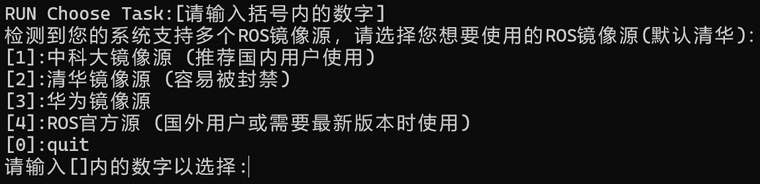 大佬,我也没有humble版本 是安装的22.04呀